SLZB-06 Review 2026 | Is This the Best Zigbee PoE Coordinator for Home Assistant?


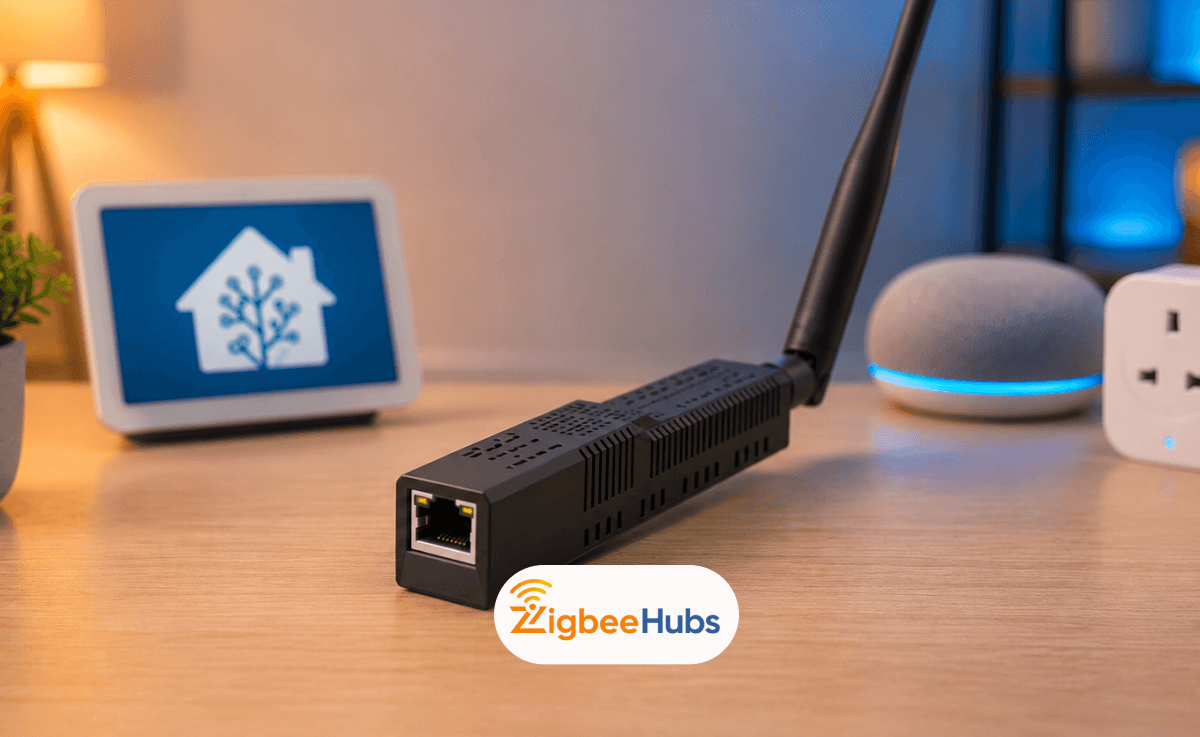
The SLZB-06 is a network-based Zigbee coordinator designed for Home Assistant, Zigbee2MQTT and other local smart home platforms. Unlike USB coordinators, it supports Power over Ethernet (PoE), remote placement and stronger single isolation, making it one of the best Zigbee coordinators for advanced and scalable smart homes in 2026.
What is the SLZB-06?
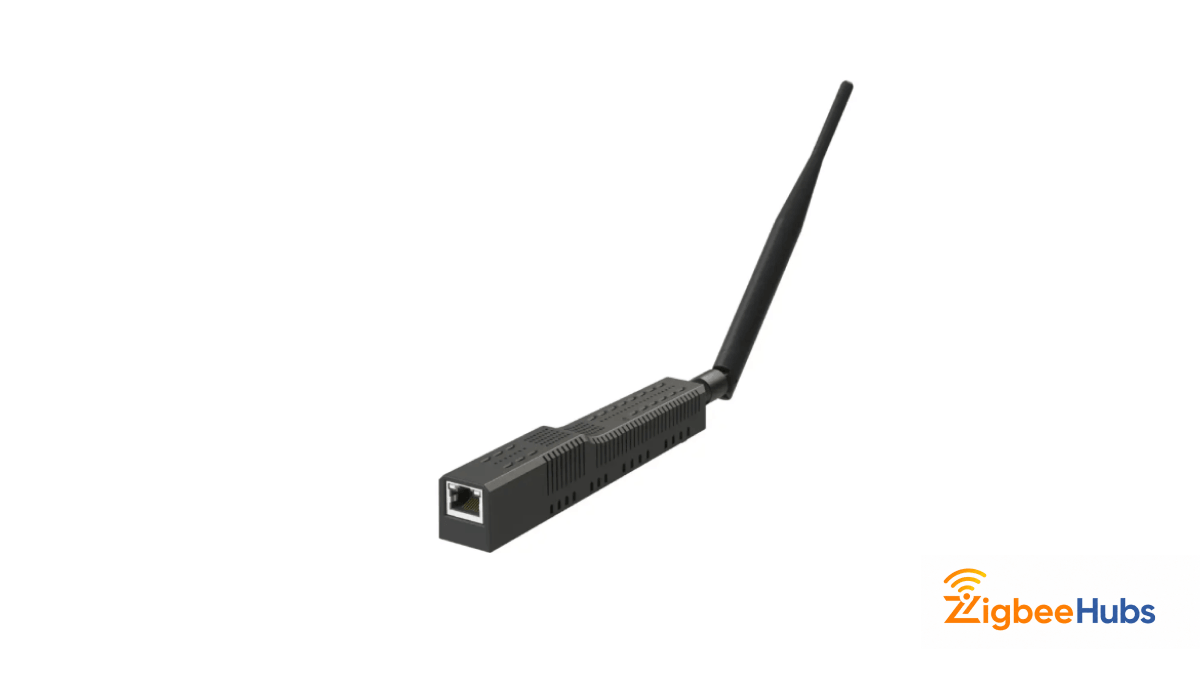
The SLZB-06 is a network-based Zigbee coordinator developed by SMLIGHT for advanced smart home users who want stable Zigbee coverage without USB placement limitations. Instead of plugging directly into your server, it connects over Ethernet and supports Power over Ethernet, making it ideal for Home Assistant, Zigbee2MQTT and local-first automation setups.
Unlike traditional USB coordinators, the SLZB-06 can be placed anywhere on your network for better radio placement and reduced USB interference.
How Did We Test the SLZB-06?
Test Environment
We tested the SLZB-06 in a real Home Assistant environment for 14 days.
Devices tested:
- 12 Zigbee sensors
- 6 Zigbee smart plugs
- 4 Zigbee bulbs
- 2 Zigbee wall switches
Software used:
- Home Assistant OS
- Zigbee2MQTT
- ZHA
Testing scenarios:
- Initial pairing speed
- Mesh stability over distance
- Device reconnection after power failure
- Coordinators recovery after network restart
Our Testing Results
After two weeks of testing, the SLZB-06 showed:
- Stable pairing performance
- No USB interference issues
- Better placement flexibility than USB dongles
- Stronger mesh consistency in multi-room deployments
What Makes the SLZB-06 Different?
Power over Ethernet Support
PoE allows the coordinator to receive both power and data over a single Ethernet cable, giving you cleaner installation options.
Network-based Deployment
Since it works over Ethernet, you can position it centrally in your home instead of near your server.
Better RF Placement
Moving the coordinator away from USB ports helps reduce wireless interference.
What are the Pros and Cons of SLZB-06?
Pros
- PoE support for clean installations.
- Network-based deployment flexibility.
- Works with Home Assistant and Zigbee2MQTT.
- Easier coordinator placement for stronger mesh coverage.
- Great for rack-mounted or server-room setups.
Cons
- Higher cost than USB coordinators.
- Slightly more complex setup for beginners.
- Requires Ethernet infrastructure to unlock full benefits.
Who Should Buy the SLZB-06?
Choose the SLZB-06 if:
- You run the Home Assistant full-time
- You want maximum Zigbee stability
- Your server is located in a poor RF environment
- You want scalable smarthome infrastructure
Choose a USB coordinator instead if:
- You are just starting with Zigbee
- You want a cheaper plug-and-play setup
- You do not use Ethernet or PoE
SLZB-06 vs SLZB-06M: Which Model Should You Actually Buy?
If you are buying an SLZB coordinator, choosing the right model matters more than most people expect.
All SLZB-06 models can connect Zigbee devices to Home Assistant but they use different radio chips, support different firmware ecosystems and offer different upgrade paths for Thread and Matter.
The best model depends on your platform:
- Use SLZB-06 if you mainly run Zigbee2MQTT and want proven CC2652P stability.
- Use SLZB-06M if you prefer ZHA or want better Silicon Labs compatibility.
- Use SLZB-06MG24 if you are planning a larger, future-focused Zigbee or Thread deployment.
For most users, the standard SLZB-06 or SLZB-06M will be the best fit.
| Model | Zigbee SoC | RAM | Max Devices | Best For | Zigbee2MQTT Support | ZHA Support |
|---|---|---|---|---|---|---|
| SLZB-06 | TI CC2652P | 88KB | 200 | Z2M users, proven reliability | Full | Full |
| SLZB-06M | EFR32MG21 | 96KB | 200 | ZHA users, Matter/Thread | Ember stack | Full |
| SLZB-06P7 | TI CC2652P7 | 152KB | 200 | Minimal advantage over base | Full | Full |
| SLZB-06P10 | TI CC2674P10 | 264KB | 200+ | Large deployments only | Full | Full |
| SLZB-06MG24 | EFR32MG24 | 256KB | 350 | Matter/Thread, future-proofing | Full | Full |
What is the Recommended SLZB Model?
For most Home Assistant users, the decision is simple.
If you are running Zigbee2MQTT today, the SLZB-06 is still the safest choice because of its mature CC2652P ecosystem.
If you are building around ZHA or planning for Thread experiments later, the SLZB-06M is usually the better long-term choice.
Only choose the MG24 models if you know you need higher coordinator capacity or advanced Silicon Labs features.
What are the Hardware Specifications of SLZB-06?
The SLZB-06 combines several components into one network-ready Zigbee coordinator.
At its core. it uses a dedicated Zigbee radio, an ESP32 networking chip, Ethernet support, USB-C power and data and an external SMA antenna for better signal coverage.
The exact Zigbee radio depends on which model you choose but the goal stays the same: stable Zigbee communication with flexible deployment options.
Full Specifications Table
| Component | Specification |
|---|---|
| Zigbee SoC | Texas Instruments CC2652P |
| Control SoC | ESP32-DOWDQ5-V3 (Dual-Core, 240MHz) |
| Ethernet Controller | Microchip LAN8720 (10/100 Mbps) |
| USB/UART Converter | CP2102N |
| RF Output Gain | +20dBm |
| External Antenna | +5dB SMA |
| PoE Standard | IEEE 802.3af (active PoE) |
| Dimensions | 160 × 26 × 22mm |
| Connectivity | Ethernet (RJ45), USB Type-C, 2.4GHz WiFi |
| Operating System | SLZB-OS (custom firmware) |
How Should you Power the SLZB-06?
The SLZB-06 gives you multiple power options, so you do not need a PoE switch to use it.
Active PoE [Recommended]
The cleanest setup uses IEEE 802.3af active PoE, where one Ethernet cable handles both power and data.
This is the best option for:
- Rack-mouthed Home Assistant servers
- Structured wiring setups
- Permanent smart home installations
USB-C Power
If you do not have a PoE switch or injector, you can power the SLZB-06 using USB-C instead,
This works well for:
- Desktop Home Assistant setups
- Testing environments
- Temporary installations
Ethernet + External Power
You can also use Ethernet for networking while powering the coordicator separately.
Important:
The SLZB-06 is designed for active PoE. Passive PoE injectors may not work correct and can damage the device.
Which Connection Mode Should You Use?
The SLZB-06 supports three connection modes.
Ethernet Mode [Recommended]
This is the best option for most Home Assistant users.
Ethernet provides the most stable performance, avoids WiFi congestion and keeps your coordinators available even during wireless network issues.
WiFi Mode
WiFi works well for temporary setups or locations where Ethernet is unavailable.
However, because both Zigbee and WiFi use the 2.4GHz band, interference can become a problem in busy environment.
USB Mode
USB mode allows the SLZB-06 to work like a traditional Zigbee dongle.
This is useful for testing, migration or troubleshooting but it removes the main advantage of network placement.
How Do You Set Up the SLZB-06 with Zigbee2MQTT?
For most users, Zigbee2MQTT is the best match for the standard SLZB-06 because of its mature CC2652P support and flexible device compatibility.
Before starting, connect the coordinator to your network, confirm it appears in the SLZB-OS dashboard and make sure Zigbee2MQTT is already installed in Home Assistant.
After powering on the SLZB-06, it will automatically receive an IP address from your router through DHCP.
You can find the assigned IP by:
- Checking your router’s DHCP client list.
- Opening
http://slzb-06.localin your browser if mDNS is enabled. - Accessing the SLZB-OS dashboard from your local network.
Write down the assigned IP before moving to the next step.
Enter the device IP address in your browser.
- Confirm the coordinator is online.
- Make sure Zigbee mode is enabled.
- Check that the serial TCP port is set to 6638 (default).
Open your configuration.yaml file and update the serial connection settings.
- Use your SLZB-06 IP address with port 6638.
- Set the adapter type to
zstack. - Create a static DHCP reservation for better long-term stability.
serial:
  port: 'tcp://192.168.1.XXX:6638'
adapter: zstackGo to the Home Assistant add-on page and restart Zigbee2MQTT.
- Wait a few seconds for the coordinator to reconnect.
- If you migrated from another coordinator using the same backup, your existing devices should appear automatically.
Open the Zigbee2MQTT logs and confirm the coordinator connects successfully.
- Look for the message:
Connected to the adapter successfully - Once visible, the SLZB-06 is ready to pair or control devices.
How to Set Up the SLZB-06 with ZHA?
ZHA works well with the SLZB-06 family, especially the Silicon Labs-based models.
In many Home Assistant installations, ZHA can automatically detect the coordinator through your network. If not, you can manually add it using the socket address.
For Manual ZHA Setup:
- Go to Settings → Devices & Services → Add Integration
- Search for Zigbee Home Automation
- Select Enter Manually when prompted for the serial port.
- ZNP for the standard SLZB-06 (CC2652P)
- EZSP for the SLZB-06M (EFR32MG21)
- Set the Serial Device Path to:
socket://[YOUR_DEVICE_IP]:6638- Leave the baud rate at default.
- Click Submit.
ZHA will initialize the coordinator and you can begin pairing devices immediately.
Note for SLZB-06M users: The EFR32MG21 chip is the same silicon used in official Home Assistant SkyConnect and Yellow adapters. This means ZHA has native, deeply tested support for the M variant, often resulting in higher LQI readings than the CC2652P equivalent.
Can You Move from a USB Zigbee DOngle to the SLZB-06?
Yes. In many cases, you can migrate to the SLZB-06 without repairing every Zigbee device.
The most important part is preserving your coordinator backup, network key and device database before switching hardware.
Once those are backed up, the migration process is usually straightforward.
Migrating in Zigbee2MQTT
Zigbee2MQTT stores your network key and device database in its configuration.yaml and database.db files. As long as you preserve these files, your devices will reconnect automatically.
Steps to Migrate Zigbee2MQTT
- Back up your Zigbee2MQTT data folder.
- Especially save
configuration.yaml,database.db, andcoordinator_backup.jsonif present.
- Stop the Zigbee2MQTT add-on before making any coordinator changes.
- Connect the SLZB-06.
- Update the
serial.portvalue inconfiguration.yamlto your new TCP address.
- Restore your network backup using the Zigbee2MQTT backup/restore feature.
- Or manually flash the coordinator backup to the new hardware.
- This is available in the SLZB-OS web dashboard under Zigbee → Backup.
- Start Zigbee2MQTT.
- Devices should reconnect within a few minutes as the mesh reforms.
Migrating in ZHA
ZHA supports full coordinator migration via its built-in backup and restore tool:
- Go to Settings → Devices & Services → Zigbee Home Automation → Configure → Migrate Radio.
- Follow the migration wizard.
- It will back up your network key and topology.
- When prompted, select your new coordinator (SLZB-06 via socket).
- ZHA restores the network key to the new hardware.
- Devices reconnect automatically.
- No re-pairing required.
Key tip: If you are migrating from a Sonoff Dongle E (EFR32MG21) to an SLZB-06M (also EFR32MG21), you can often skip the migration wizard entirely. The SLZB-06M supports IEEE address spoofing, you can set the new coordinator's address to match your old dongle's address exactly, making the transition invisible to your device network.
What Can You Do in the SLZB-OS Dashboard?
One of the biggest advantages of the SLZB-06 over a basic USB dongle is remote management.
The built-in SLZB-OS dashboard lets you manage firmware, network settings, backups, diagnostics and connection modes without physically touching the coordinators.
Most Useful Features
- Remote firmware updates
- Backup and restore tools
- Ethernet / WiFi / USB mode switching
- Built-in diagnostics
- WireGuard VPN support
- ESPHome integration
How Does the SLZB-06 Perform in Real Homes?
In real world testing, the biggest advantage was not raw speed, it was placement flexibility.
Because the coordinator can be installed away from your server, it becomes much easier to build a stronger Zigbee mesh with better signal consistency across multiple rooms.
Ethernet mode also avoids the wireless congestion that can affect WiFi-based coordinators.
For larger homes or multi-floor setups, this can make a noticeable difference in network reliability.
Is the SLZB-06 Ready for Matter and Thread?
That depends on the model.
Some SLZB variants support firmware switching Zigbee and Thread but a single coordinator cannot run both at the same time.
If you are already invested in Zigbee, staying with Zigbee is still the best choice for most Home Assistant users.
if you are planning a future Matter setup, the Silicon Labs models may give you more flexibility later.
 Sarah Diyana
| Model | Thread Support | Notes |
|---|---|---|
| SLZB-06 (CC2652P) | Firmware switch required | Can be flashed to Thread-only mode; loses Zigbee. |
| SLZB-06M (EFR32MG21) | Switchable | Toggle between Zigbee and Thread via SLZB-OS. |
| SLZB-06MG24 (EFR32MG24) | Native | Best Thread support; 350 device ceiling. |
Can You Multiple SLZB-06 Coordinators in Home Assistant?
Yes. You can run multiple SLZB-06 coordinators in one Home Assistant setup, but each coordinator needs its own Zigbee network.
This means each SLZB-06 should have its own IP address, port and separate Zigbee2MQTT or ZHA instance. You cannot run two coordinators as one single shared Zigbee mesh.
Running multiple coordinators is useful for:
- Large homes
- Multi-floor buildings
- Detached garages or workshops
- Separating stable devices from experimental devices
- Testing different Zigbee channels or firmware versions
Home Assistant can still show devices from each Zigbee network in one dashboard, even though the coordinators are running separately in the background.
 Ishara Fernando
Best Practice:
Use different Zigbee channels for each coordinator to reduce interference between networks.
What are the Most Common SLZB-06 Problems?
Most SLZB-06 issues are usually caused by IP changes, wrong adapter settings, PoE confusion, or network migration problems. here are the fixes to check first.
| Problem | Likely Cause | Quick Fix |
|---|---|---|
| Device unavailable after switching to Ethernet | IP address changed | Set a static DHCP reservation and confirm port 6638. |
| Zigbee2MQTT will not connect | Wrong adapter type | Use zstack for SLZB-06 and ember for SLZB-06M. |
| ZHA will not connect | Wrong radio type selected | Use ZNP for SLZB-06 and EZSP for SLZB-06M. |
| PoE does not power the device | Passive PoE or unsupported injector | Use IEEE 802.3af active PoE or USB-C power. |
| Devices do not reconnect after migration | Network key or backup mismatch | Restore the correct backup and confirm the network key. |
| Weak Zigbee signal | Poor coordinator placement | Move the SLZB-06 to a more central location away from routers, metal objects, and USB 3.0 devices. |
Is the SLZB-06 Worth It? Final Verdict
If you are building a serious Home Assistant Zigbee network, yes.
The SLZB-06 gives you better placement flexibility, cleaner installations, easier remote management and stronger long-term scalability than most USB coordinators.
It is not necessary for every setup but if your Zigbee network is growing, it is one of the best upgrades you can make. Choose SLZB-06 for Zigbee2MQTT, choose SLZB-06M for ZHA or Thread planning and choose MG24 only if your need larger-scale deployment.